 By
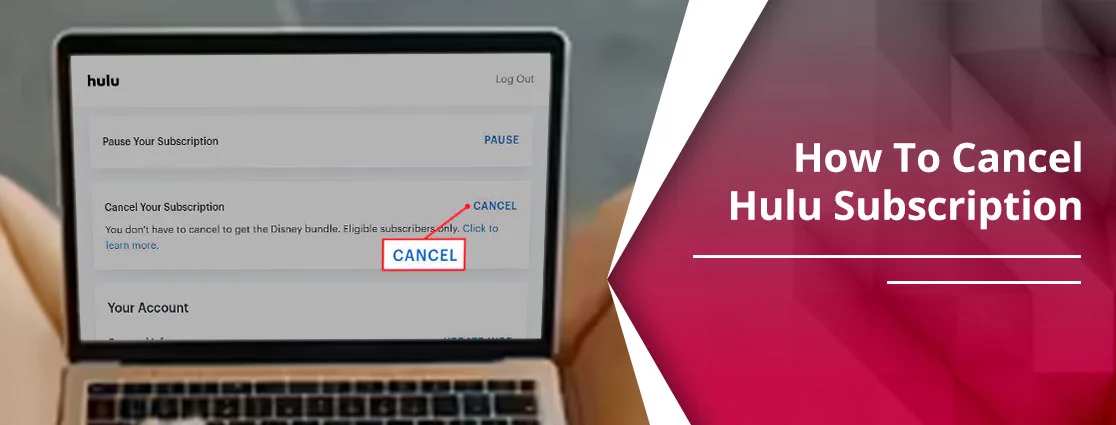
By Whether you’re concerned about Hulu’s price hike due to its merger with Disney+, are bored with its content and want to explore a new option, or wish to close your account entirely, you can cancel your Hulu subscription easily. No matter your plan (existing or free trial) or device, cancellation is possible through the original subscription source. Hulu does not offer refunds upon cancellation. Once cancelled, you will be able to access its content library until the subscription lasts. Let’s understand the plan cancellation steps!
Summary
- Hulu Subscription: Hulu offers monthly and annual plans for users, which they can buy from the official website and via third-party options like Apple, Amazon, Roku, etc.
- Official Cancellation steps: The direct option to cancel the Hulu plan is its official website: Hulu.com. Visit account page > select “cancel” under “Your Subscription” tab > and tap “Cancel Subscriptions.”
- Billing period: Before you perform cancellation steps, know when the current plan ends. The services will stop if it’s the last date of the billing cycle. Otherwise, it will continue till your subscription ends.
- Refund is not provided on Hulu; however, you can be safe from unwanted charges if you cancel it on time.
How to cancel Hulu subscription
Your Hulu plan – standalone or bundled – can be cancelled through its original subscription source. To do this, visit the official Hulu website (Hulu.com), log in to your account, and locate the cancel option. Below, we mention the legitimate steps along with device-specific guides.
How To Cancel Hulu On Web Browser: Direct Official Steps!
To unsubscribe from Hulu through a browser, follow this.
- Open a browser and visit Hulu.com.
- Log in to your account.
- Select the profile > Account.
- Select the Cancel option under the Your Subscription tab.
- Ignore the Pause offer.
- Select “Continue to cancel”
- Add a reason to cancel.
- Tap “Cancel Subscription”
Cancelling Hulu via Third-Party Billing
If subscription is availed through third-party options, learn to unsubscribe through their official platforms. Here’s how:
1. How To Cancel Hulu On iPhone Or iPad (Apple App Store)
If you have billed Hulu through an Apple ID, here’s how you can end your plan.
- Open your iPhone’s settings app.
- Tap your Name from the top.
- Tap Subscriptions.
- And click subscription and select Hulu from the list.
- Click “Cancel Subscription.”
If your plan is already cancelled, you will notice a red color expiration message, plus no cancellation button.
2. How To Cancel Hulu On Android (Google Play Store)
When you bought a Hulu subscription via the Google Play Store, cancellation is possible this way.
- Visit Google Play Store on your Android device.
- Select the profile from the top right corner.
- Tap “Payments & Subscriptions”’
- Select Hulu subscription.
- Tap cancel subscription.
3. How To Cancel Hulu On Roku
If your Hulu plan is billed through Roku, cancellation steps should be performed on the official Hulu platform: Hulu.com. Follow the steps and avoid being charged through Roku.
- Visit Hulu.com on your browser.
- Log in to your Hulu account.
- Find the “Your Subscription” tab and click “Cancel”
- Ignore the pause notification and click “Continue to cancel”
- Finally, tap ‘Cancel Subscription’ and complete the process.
Or, if you want to cancel Hulu through a Roku device, follow the given steps:
On device:
- Tap the Home button 仚 on your Roku remote.
- Highlight Hulu using the arrow button on remote.
- Press “Star” icon.
- Tap “Manage subscription”
- Select “turn off auto-renew” option.
On website:
- Visit my.roku.com.
- Tap manage your subscriptions.
- Select your hulu subscription under “Active Subscription.”
- Pick “manage subscription”
- Select “Turn off auto-renew”
How To Cancel Hulu On Amazon
You can revoke your Hulu subscription on the Amazon platform using Amazon Pay, and stop getting charged in future. This happens when you cancel the merchant agreement. Check the steps:
- Visit the Amazon Pay activity page and Sign In.
- Check your Amazon Pay orders.
- Find the “Merchant agreements” tab.
- Navigate to Hulu subscription and tap “Details & Support.”
- Select “Cancel” under the “Manage merchant agreement.”
- Tap the “cancel agreement” in the dialog box.
Note: Amazon will send an email confirming that your Hulu plan is now cancelled.
Why Can’t I Cancel Hulu? (Troubleshooting Guide)
In some scenarios, you can’t cancel your Hulu subscription because of a different billing provider, account suspension, following steps on the app, not the browser, and more. Discover the leading cause:
- 1. Different billing provider: if you select the wrong platform to cancel the subscription, not the one you used to subscribe to, you are unable to discontinue your Hulu plan. Although the steps are mainly performed on the official Hulu website, you need to look for the third-party options if they’re charged for your subscription.
Fix: Identify which platform is being charged through the official Hulu platform. Simply, log in to your Hulu account > check the “upcoming charges” section > tap History and get to know.
After your billing source is identified, visit the platform and stop the plan immediately.
- Pause Enabled: Is your Hulu plan paused? This can restrict your plan cancellation.
Fix: Resume your plan before you want to cancel Hulu. To reactivate the plan, visit Hulu’s account page (using your account credentials) and reactivate it.
- App Usage: If you’re trying to stop your Hulu plan through your app, you will fail to do so. Cancellation steps are performed on the web browser on the official Hulu website.
Fix: When going to cancel your plan, visit your Account page, and follow the quick steps. For step-by-step information, refer to the previous sections.
Hulu Refund Policy
Hulu does not refund the money for a free trial, an active subscription, or a promotional offer to buy a plan after its duration expires. After buying a subscription, if you cancel immediately before the plan term, you will not be charged. But when you do it after your free trial ends, you’re charged for the entire billing cycle.
In short, if you cancel Hulu within the plan duration, you are exempt from charges. While later to this will cost you the entire subscription fees.
Let’s understand with an example:
If you are utilizing a free trial on Hulu (30 days if you’re a new or returning customer) and want to cancel it, the best time to cancel is within the free trial period to avoid charges.
Whereas, when you cancel after the trial period, which is 30 days, a subscription will be active based on your preference – you need to pay for monthlly and annual plan.
Pause Your Subscription (For Short-Term Break)
Instead of cancelling your plan entirely, you can select an alternative to cancel, which is “Pause the subscription temporarily.”
Just like cancellation, pausing can also be done on Hulu anytime. Remember that your account will reactivate automatically once a new billing cycle starts.
Steps to pause Hulu plan:
- Visit the Hulu official site on your browser.
- Log in using your account details.
- Find the “Your Subscription” option.
- Tap “Pause” beside “Pause Your Subscription” at the bottom.
- Select how long you want to pause Hulu: up to 12 weeks.
- Finally, tap “submit”
Note: You can pause your Hulu plan only when bought directly, or through Amazon and Roku.
Final Words
Terminate the current Hulu plan before it gets renewed for the next billing cycle. Multiple methods are available for plan cancellation; however, the right step will be your original billing source. You can cancel through the official Hulu website, through app stores (Google Play or Apple Store), and on third-party websites: Amazon, Roku, and others.
Frequently Asked Questions:
1. Can I cancel Hulu anytime?
Yes, Hulu subscribers can stop their plan anytime they want. However, cancelling after the start of the next billing cycle is chargeable.
2. Why am I still being charged after cancelling?
Because you performed cancellation steps after starting a new plan.
3. Can I cancel Hulu through the app?
Not at all! You can follow the Hulu plan cancellation steps only on its official website or a third-party site, not on the app.
4. Is Hulu cancellation immediate?
Yes, as you complete the steps for Hulu plan cancellation, it will stop the subscription; however, you can still access content until the current billing cycle ends.
5. Why is there no cancel button on my Hulu account?
If you can’t find the “cancel” button on your Hulu account, it’s because you’re billed through a third-party source, not directly on Hulu.